IBM Notes and Domino V9.0.1 ondersteuning door IBM is verlengd tot minstens 2021

Today IBM announced that support for IBM Notes and Domino, Traveler, and IBM Enterprise Integrator (formerly Lotus Enterprise Integrator) V9.0.x are being extended through at least September 2021.
Support will also be extended through at least Sept 2021 for the associated entitlements to IBM Sametime 9.0 Limited Use, IBM Domino Designer 9.0.1, IBM Mobile Connect 6.1.5, and IBM Domino Global Workbench 9.0.1.

ibm-notes-domino-support-extended

Bron: IBM
Auteur: Morgan Provost

IBM Notes and Domino V9.0.1 is extending support through at least 2021 and now includes social capabilities from IBM Connections V5.5.

The latest version of the Notes and Domino 9 Social Edition delivers enhanced value to power social businesses with improved collaboration, mobile and application development capabilities. With IBM Notes and Domino V9.0.1 Social Edition, you get a series of quality and usability enhancements to help power social businesses, additional accessibility support for IBM Domino and enhancements from IBM Notes Traveler V9.0.1.

IBM Notes and Domino 9.0.1 can help you:

  • Increase productivity by eliminating the need to switch to other applications to take action.
  • Improve mobility by supporting “bring your own device” (BYOD) with full-featured mobile collaboration on an extensive range of devices.
  • Integrate, develop and deploy business applications faster and more easily than ever. IBM Domino 9.0 supports Security Assertion Markup Language (SAML) and Open Standard for Authorization (Oauth).
  • Reduce total cost of ownership with tools to simplify administration and support.
  • Provide a security-rich environment while enabling a more effective workforce.

In addition, IBM Notes and Domino V9.0.1 now includes social capabilities from IBM Connections V5.5, an integrated, security-rich platform that helps people engage with networks of experts in the context of critical business processes. IBM Connections enhances the social toolset of IBM Notes and Domino V9.0.1, enabling you to quickly locate the people and content you need through integrated access to your collaboration applications. Also note that IBM Connections V5.5 is the certified version for use with IBM Verse On-Premises, which is expected later this year.

The IBM Connections 5.5 entitlement included with the licenses below lets IBM Notes and Domino V9.0.1 customers deploy and access the Files and Profiles features of IBM Connections through all clients, browsers and mobile devices, at no additional charge.

  • IBM Domino Enterprise Client access license
  • IBM Domino Messaging Client access license
  • IBM Domino Collaboration Express® license
  • IBM Domino Messaging Express license

The Files feature helps users easily share content with other people and removes the need to send large files through email. Users can socialize content, allowing people to easily find it, make recommendations and share with other people. The Profiles feature helps users find the people they need by searching across the organization’s content using tags to identify expertise, current projects, and responsibilities and socializes skills, interests, and organizational structure for others to discover and benefit from the information.

IBM also announced today that Notes and Domino, Traveler and Lotus Enterprise Integrator V8.5.x are being withdrawn from marketing on December 13, 2016. While service and support for V8.5.x will be available through September 13, 2018, this is the perfect time to start your upgrade to Notes and Domino V9.0 if you haven’t already.

Over the past few years, we have been incrementally delivering much of the value that you expected to come out in new versions of IBM Notes and Domino through fix packs, with things like TLS 1.2 and Windows 10 support, interim releases such as 9.0.1 for 64bit Macs, and adding support for Microsoft Outlook as well as features to improve application performance and usability.

Going forward, we intend to continue leveraging this incremental delivery model to ensure that our on-premises customers are able to experience the latest features, such as support for Java 8 and the Microsoft Edge browser, in line with more-agile cloud releases. As such, fixes and features will be delivered together and will continue to be accessible through IBM Fix Central.

Boekcover Waarom ik niet in Arnhem wonen wil met abstracte illustratie.

Arnhems dialect

Een klein persoonlijk stukje, niets met programmeertalen, waar ik dagelijks mee werk te maken, maar met een andere taal, namelijk het Arnhems dialect.

Op mijn paspoort staat geboorteplaats Arnhem.
Wij woonden dan wel in Oosterbeek, de bevalling vond plaats in het Diaconessen ziekenhuis in Arnhem.
Mijn jeugd heb ik dan ook doorgebracht in Oosterbeek, zo als ze wel zeggen het ‘chique dorp’, onder de rook van Arnhem.

Terug naar Arnhem

In 1991 verhuisde ik naar de toen nieuw opgeleverde huurwoningen in de Arnhemse wijk Rijkerswoerd.
Na kort nog een koopwoning in de Arnhems wijk de Laar te hebben gehad vertrok ik uit Arnhem om samen te gaan wonen in Westervoort.
Kort daarna verhuisden wij naar het Overbetuwse Zetten, zo snel mogelijk weer gevolgd door een verhuizing naar Heteren.
In Heteren zijn wij voor ons doen lang gebleven, maar toch liet Arnhem ons niet los.
In 2016 zijn wij dan ook weer teruggekeerd naar bekend terrein:  Arnhem-Zuid.

Waarom ik niet in Arnhem wonen wil

Min of meer als grap kocht ik daarom het boekje ‘Waarom ik niet in Arnhem wonen wil’, een verhalenbundel uit 2008.
Om eerlijk te zijn vond ik de verhalen niet bijzonder.
Maar om het stukje geschreven door Martin Pieterse moest ik toch wel lachen. Een tweetal citaten:

De Arnhemse jeugd is genadeloos, als zij enige afwijking van de norm ontdekt. In Klèrendal hejje zo uh posje klappe te pakke. Heel snel corrigeerde ik mijn uitspraak, om geen ‘portie klappen’ te krijgen. Het Ernems, zoals het dialect in Arnhem heet, is heel erg. Sommige woorden worden half ingeslikt, andere worden lang en lijzig uitgerekt. ‘Je moet niet huilen, hoor’ wordt uitgesproken als ‘Je moenie heule, heur’, waarbij de eu-klank in het woord heule klinkt als een kind dat een snelle motorfiets nadoet, die door de bocht van de Bejrekeul scheurt.”

Opvallend veel woorden uit het Algemeen Beschaafd Nederlands kun je in het Ernems helemaal niet uitspreken, omdat de mond van de Ernem-spreker in een bepaalde stand staat, die on-Ernemse klanken niet toelaat. Woorden uitspreken als ‘staatshervorming’, beschavingsoffensief’ of ‘wezenskenmerken’: dat lukt een oer-Arnhemmer niet. Ernems is dan ook een serieuze handicap bij het volgen van hoger onderwijs.

Ernemse tongval

Op Wikipedia staat een verklaring voor deze tongval:
Het Arnhemse dialect Ernems wijkt sterk af van andere Zuid-Gelderse dialecten door de Haagse invloeden. In de tweede helft van de 18e eeuw trokken rijke Hagenaars naar buitenhuizen in de bossen rondom Arnhem. Het Haagse accent werd door de lokale Arnhemse bevolking overgenomen omdat dit accent status verschafte.

Nou dan weet u dat ook.
Wanneer ik dan als ICT consultant bij u over de vloer kom, en u denkt wat praat die man vreemd, dan is dat niet het gemis van een beugel in mijn vroege jaren, maar gewoon Ernems 😉

Bronnen

  • Website van mijnwoordenboek.nl
  • Boekje “Waarom ik niet in Arnhem wonen wil” van Uitgeverij PlaatsMaken, 2008
  • Website indebuurt.nl
  • In de boekenreeks Taal in stad en land gaat schrijver Jan Berns verder in op onze taalregio
  • Op het YouTube kanaal van Stefan Vernooy vond ik het prachtige nummer van Jofele Japie en de Beunhazen: ‘t Ernems Volkslied

Fixpack 6 voor Domino/Notes 9.0.1 is uit

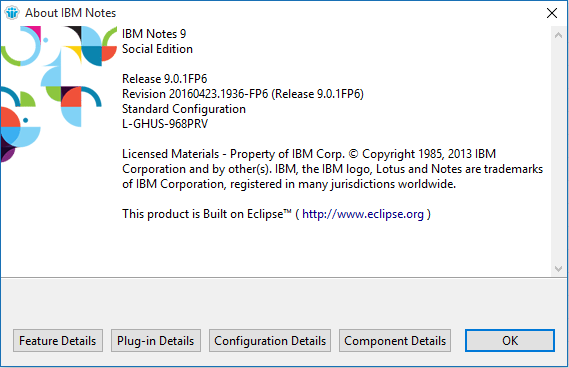
Fixpack 6 (FP6) voor Domino en Notes 9.0.1 is uit.

http://www-01.ibm.com/support/docview.wss?uid=swg24037141

IBM Notes/Domino 9.0.1 Fix pack 6 Release Notice

9.0.1 Fix pack 6 is a collection of low-risk, high-impact fixes to help customers safely avoid known issues. IBM strongly recommends that customers running Notes/Domino 9.0.1x upgrade to this latest Fix Pack since it addresses a small percentage of defects that impact the broadest set of customers. Fix Packs are released periodically between Maintenance Releases to provide a greater level of stability for customer environments. They go through the same level of fix, regression and interoperability testing that occurs with Maintenance Releases. Fix Packs are always cumulative and contain all of the fixes from previous ones. All Fix Packs are language independent and may be applied on any language version of Notes/Domino 9.0.1x.

Notes/Domino 9.0.1 Fix pack 6 addresses defects in the Client, Server, Notes Browser Plug-in and Domino OpenSocial component.

Supersedes
9.0.1 Fix pack 6 includes all of the content and supersedes the following deliverables:

  • Notes: 9.0.1 FP5 IF1, IF2, IF3
  • Domino: 9.0.1 FP5 IF1, IF2
  • JVM Patch: 1.6 SR16FP15

Important Notes

9.0.1 Fix Pack 6 updates the embedded Notes/Domino JVM to 1.6 SR16 FP20 to address security vulnerabilities.
9.0.1 Fix Pack 6 adds support for IBM i 7.3. For more information, see http://www-01.ibm.com/support/docview.wss?rs=463&uid=swg21977077

Known Issue

SPR XXLI9RNB7U – Windows Domino Server: JVM version is reverted to 9.0.1 gold’s version when un-installing/downgrading from 9.0.1 Fix Pack 4 to a prior Fix Pack. This will not impact most customers, as downgrading to a prior fix pack is not a common operation. This issue also does not affect future fix pack upgrades. DETAILS: On Windows, the Domino server installer gives you an option to downgrade to either a prior Fix Pack level or to the gold release. If customers want to downgrade to an earlier Fix Pack level, it is recommended that you un-install the Fix Pack, which will leave the server at 9.0.1 Gold, then proceed with the Fix Pack install of your choice. This will ensure the correct JVM level is installed.

Download Options
For download options see technote 4037141 – “Download Options for Notes & Domino 9.0.1 Fix Packs”. Note: Fix Packs will not be distributed on physical media (DVD/CD).

If you have Notes 9.0.1 Basic Configuration or Notes/Admin/Designer (Basic edition) 9.0.1 installed, use the Notes 9.0.1 Fix pack 6 Basic install.
If you have Notes 9.0.1 Standard Configuration or Notes/Admin/Designer (Standard edition) 9.0.1 installed, use the Notes 9.0.1 Fix pack 6 Standard install.
If you have Notes Mac Client – IBM Notes Mac 9.0.1 32-bit is superseded by Mac 9.0.1 64-bit. Customers looking for a Notes Mac fixpack 32-bit client are encouraged instead to download and install Notes 9.0.1 Mac 64-bit. Download links can be found in this document: Supportability Q&A about IBM Notes and OS X 10.11.x

Decision to upgrade
Customers unable to upgrade to later Releases should install Fix Packs to benefit from later fixes made to the product. By providing a small number of fixes, customers are able to accept fewer code changes with lower risk, allowing them to “patch” an older Maintenance Release until a more extensive upgrade to the current Release is possible.

While Fix Packs provide important fixes and IBM strongly recommends applying the latest Fix Pack available for a Maintenance Release, IBM still recommends that customers upgrade to the latest Release + Fix Pack combination to receive the broadest set of fixes available. You will receive more overall fixes with a later Release + Fix Pack than with a set of Fix Packs on top of an earlier Maintenance Release. For more information, see technote #1368141-“Differences between Notes/Domino Maintenance Releases, Fix Packs and Upgrade Packs.”

Fixes contained in this Fix Pack
A plus symbol (+) before the SPR number indicates a fix for a regression bug. A regression bug is an issue that was introduced in a Maintenance Release but did not exist in previous releases of that code stream. For example, a bug that appears in 9.0.1 but did not exist in 9.0.0 is a regression.
If an APAR exists for the corresponding SPR, the APAR number will appear in parentheses next to the SPR number. For example, SPR #nnnnnnnnnn (LO12345).

What follows is a subset of the most important issues addressed in this fix pack. For the full list of fixes, visit the fixes by release view for the description of each fix in this Fix Pack, including platform specific information.

9.0.1 Fix pack 6 Fix List descriptions:

Client

  • DSCK9TUNDR (LO87200) – Fixes Notes Windows Client issue: No more handles java/lang/OutOfMemoryError when in High Resolution mode. This is a regression in FP4. (technote 1977626)
  • JFCG9J3USJ (LO79962) – Fixes a potential Notes crash on very specific email addresses when a delivery failure notice is resent.
  • MBLTA4SEFK (LO79586) – Installing 9.0.1 FP5 Notes Windows Standard Client on top of another 9.0.1 FP/ or 9.0.1 FP4IF2, fails. This is a regression in 9.0.1 FP5. (technote 1972353)
  • RHOE9LUCJ7 (LO81184) – Fixes issue where the wait cursor can continually displayed after Notes is started.
  • WHAM7ESERK (LO29769) – Fixes issue where temporary attachment files from the system temp directory were not deleted when Notes was closed/restarted. Additionally, an optional new Notes INI variable to delete files from the Notes temporary attachments directory upon Notes close/restart: AttachmentsDirectoryDelete=1 has been provided. This is off by default. (technote 1100416)
  • YSAI9HDEFK (LO87259) – Fixes issue that prevented the Notes Client printing to a Xerox printer. (technote 1903022)
  • GMAA9BGEGS (LO77014) – Fixes Windows Notes Client installation failure with error: “XPD: 09.09.2013 12:40:26 CActionsCommon/GetProperty: DEBUG – Retrieved property: RCP_INVALID_EXTERNAL_JVM_ERROR, Value: External VM is not valid – it must be a 1.5 or 1.6 Sun or IBM VM.”. This only occurs on machines that have had JVM 1.5 & 1.6 removed from the OS.
  • JKEY9ZKJYR (LO86136) – Creating a new calendar entry on Windows 10 Norwegian locale leads to blank start date/end date.

Server

  • WBJT9YVM48 (LO85846) – Fixes MIME messages with character encoding CP936 (Simplified Chinese) displaying as garbage on the Notes Client. (technote 1977628)
  • HYYH9DF5GR (LO77900) – Fixes situation where emails in trash are not removed even if “Permanently delete documents after X hours” is set. This fix introduced a new Notes.ini CHECK_EXPIRED_SOFT_DELETES_ON_DBOPEN=1. This is off be default.
  • PACY9CGLQ3 (LO77454) – If the Client ID files has a newer name and the ID vault has the older name, after a sync, the Client ID file is reverted to use the older name and the user loses access.
  • MKIN9WMUYH (LO85291) – This fix allows a user to add a custom response header in the web server by setting notes.ini: HTTPAdditionalRespHeader=; Example: HTTPAdditionalRespHeader=Cache-control: no-cache. (technote 1962324)
  • MKIN9WHT2N (LO84986) – Fixed an issue where an uncaught throw in URLstream::WriteChar crashes the web server.
  • DADS9Q3JW5 (LO82428) – Fixes Domino Server crash while converting MIME messages on HTTable::GetTableTextSize.
  • KHRL9AKSPM (LO76633) – Fixes Domino Server crash when the Dir$ function is used against a drive that is not mapped. This is a regression in 9.0.
  • MKINA3SPYN (LO86887) – Fixes an intermittent Domino Server crash in crypto code when VerifyMAC() is passed a bogus length.
  • SHJR9HDJC7 (LO79624) – Fixes and intermittent Domino Server crash when decrypting SMIME due to an access violation in memory below SM_WriteToAsnBuf.

iNotes

  • KMOAA6LDVX (LO88282)- Fixes iNotes mail or calendar create failure when using Firefox 44/45. (technote 1978919)
  • MLEY9LKEFQ (LO81065) – iNotes ‘More’ menu items are blanked in Internet Explorer with ActiveX attachment. This is a regression introduced in 9.0.1.
  • YGAO9VNL8U (LO84666) – Notes Web: Fixed an issue where some right-click menus displayed slowly using IE.

Volgnummer probleempje in IBM Notes

Een klant had een raar probleem. Een database waar documenten een volgnummer kregen bij het aanmaken, bleek ineens dubbele nummers te krijgen.
Waar de nummering eerder nog iets in de 18 miljoen was, begon het ineens weer met 16.877.210. En dat herhaalde zich een paar keer.
Na inspectie van de code bleek de teller bijgehouden te worden in een document. Niet ongebruikelijk, de code klopte ook, en werkte nog steeds goed.
Maar deze database had ook een replica. Ondanks dat de teller slechts in een database werd gebruikt leek Notes bij het repliceren toch telkens overtuigd dat de replica met het oudere teller document nieuwer was dan de bron database, die wel degelijk nieuwer was.

Na controle van het replica id hadden we het over het volgnummer dat Notes gebruikt om samen met de datum te bepalen welk document in een replica nieuwer is.
Een collega Notes specialist die goed met cijfers is zag direct wat het was: de nummering in het volgnummer (sequence number) kan bestaan uit maximaal FFFFFF. Dit is gelijk aan 16.777.215, en daarna begint het tellen weer bij 0.

In ons geval was het nummer in de originele database dus over de FFFFFF heen gegaan, en had daarmee een lager nummer gekregen dan het replica document, waardoor telkens bij het repliceren het oudere document weer terug werd gerepliceerd waardoor ook de teller voor de documenten weer lager was.

Door een nieuw teller document aan te maken was het probleem weer opgelost, maar dit was wel de eerste keer dat ik dit zag in een Notes database.

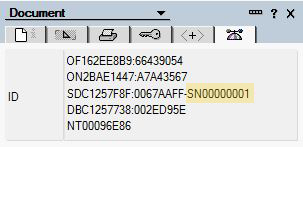
Leuk die theorie, maar waarom staat het volgnummer bij een nieuw document dan op 00000001 (8 posities), wat in mijn ogen aangeeft dat het tot FFFFFFFF (4.294.967.295) kan gaan en niet tot FFFFFF?
Dat antwoord kan ik helaas (nog) niet geven, maar een korte test met een code loopje gaf uitsluitsel, na 00FFFFFF begon het nummer weer met 00000001. Of dit een bug is of een bewuste keuze durf ik niet te zeggen.

Even wat uitleg over het sequence number:

Als database A een document bevat met een bepaalde UNID en database B bevat een document met het zelfde UNID, zal de replicator concluderen dat deze twee documenten replica kopieën van elkaar zijn.
In dat geval, gaat de replicator verder met het volgnummer en sequentietijd van de twee documenten te onderzoeken.
Als het volgnummer en de tijd van aanpassing het zelfde zijn voor beide documenten , dan is er volgens de replicator geen actie vereist omdat de documenten gelijk zijn aan elkaar.
Aan de andere kant, als een van beide, het volgnummer of de tijd van aanpassing, of beide, verschillen tussen de twee documenten, dan moet de replicator beslissen welke recenter is en het oudere document actualiseren met de inhoud van de meest recente versie.

Als een document is bijgewerkt maar het andere document niet, wordt het sequentienummer van het eerste document groter dan die van het andere document.
De replicator behandelt deze zaak door het overschrijven van het andere document met de eerste, waardoor de twee databases weer synchroon zijn.

Universal Note ID (UNID)=
OF162EE8B9:66439054
ON2BAE1447:A7A43567
SDC1257F8F:0067AAFF-SN00000001
DBC1257738:002ED95E
NT00096E86

Sequence Time =
OF162EE8B9:66439054
ON2BAE1447:A7A43567
SDC1257F8F:0067AAFF-SN00000001
DBC1257738:002ED95E
NT00096E86

Sequence Number =
OF162EE8B9:66439054
ON2BAE1447:A7A43567
SDC1257F8F:0067AAFF-SN00000001
DBC1257738:002ED95E
NT00096E86

De overige regels zijn:
Originator ID (OID) =
OF162EE8B9:66439054
ON2BAE1447:A7A43567
SDC1257F8F:0067AAFF-SN00000001
DBC1257738:002ED95E
NT00096E86

OID.File =
OF162EE8B9:66439054
ON2BAE1447:A7A43567
SDC1257F8F:0067AAFF-SN00000001
DBC1257738:002ED95E
NT00096E86

OID.Note =
OF162EE8B9:66439054
ON2BAE1447:A7A43567
SDC1257F8F:0067AAFF-SN00000001
DBC1257738:002ED95E
NT00096E86

Global Note ID (GNID) =
OF162EE8B9:66439054
ON2BAE1447:A7A43567
SDC1257F8F:0067AAFF-SN00000001
DBC1257738:002ED95E
NT00096E86

Database ID (GNID.File) =
OF162EE8B9:66439054
ON2BAE1447:A7A43567
SDC1257F8F:0067AAFF-SN00000001
DBC1257738:002ED95E
NT<00096E86

Note ID (GNID.NoteID) =
OF162EE8B9:66439054
ON2BAE1447:A7A43567
SDC1257F8F:0067AAFF-SN00000001
DBC1257738:002ED95E
NT00096E86

SSL certificaat omzetten naar Domino kyr bestand – de nieuwe methode

Vorig jaar schreef ik een stukje op dit blog over het omzetten van een wildcard certificaat naar een Domino kyfile om te gebruiken met de Domino webserver.
Dit moest toen nog met een omslachtige methode die hier beschreven is: ssl-certificaat-omzetten-naar-domino-kyr-bestand

Met een IBM Domino Administrator / IBM Notes cliënt vanaf versie 9.0.1 FP2 IF2 is het importeren van een (SHA-2) (wildcard) certificaat van een ander systeem zoals Microsoft Internet Information Services zonder een nieuw Certificate Signing Request een fluitje van een cent geworden.

Deze stappen beschrijven het proces op een Microsoft besturingssysteem.

Benodigdheden:

  • IBM Domino Administrator / IBM Notes, minimaal versie 9.0.1 FP2 IF2, of HCL versies vanaf 10.x.
  • OpenSSL (www.openssl.org)
  • Domino Keyring Tool (support.hcltechsw.com)
  • Eenvoudige tekstverwerker zoals kladblok of Notepad++

Installeer de benodigde programma’s op het werkstation.

Kopieer kyrtool.exe naar de Notes programma map waar ook nlnotes.exe staat e.d.

Indien het certificaat geen pfx bestand is dient dient het wildcard certificaat eerst te worden geëxporteerd of te worden omgezet naar een pfx bestand. Zorg er voor zowel de private key en alle certificaten in de keten te exporteren. Exporteren kan vanuit IIS, maar ook via een Browser.

In de volgende stappen gaan we er van uit dat het pfx bestand was geëxporteerd naar een map cert op de C: schijf van het werkstation.

Open een Windows command prompt en start OpenSSL. Type het volgende commando om het geëxporteerde pfx bestand om te zetten naar een pem bestand

pkcs12 -in -out -nodes -chain

in ons voorbeeld wordt dat dus:

pkcs12 -in c:\cert\test.pfx -out c:\cert\server.pem -nodes -chain

Open het hierboven gemaakte pem bestand met bijvoorbeeld Notepad++. De Private key en de informatie van uw wildcard certificaat zouden zichtbaar moeten zijn, en indien van toepassing  de informatie van het intermediair en root certificaat van uw CA.

Als alleen de private key en eigen wild card informatie beschikbaar is zullen de intermediair en root certificaat informatie geëxporteerd  moeten worden uit de pfx bestanden door middel van certmgr.msc in de volgende stappen, of deze informatie moet beschikbaar zijn van de certificaat aanbieder.

Open certmgr.msc en importeer het .pfx bestand.

Als voorbeeld hebben wij de informatie van onze eerdere publicatie gebruikt:

In dit voorbeeld heeft een klant 1 bestand met de extensie pfx.
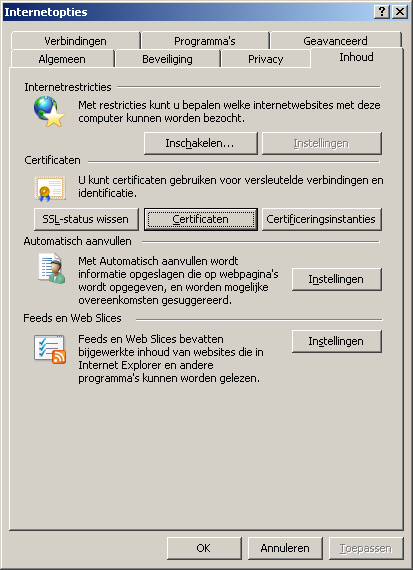
Start Internet Explorer, klik op Extra > Internet opties > Inhoud.

certsrv_ie01

Klik op de knop Certificaten.

certsrv_ie02

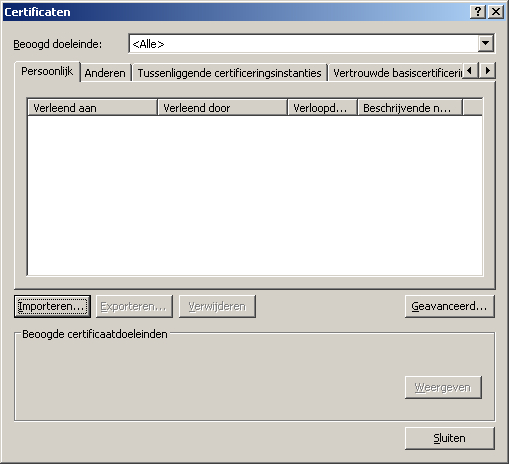
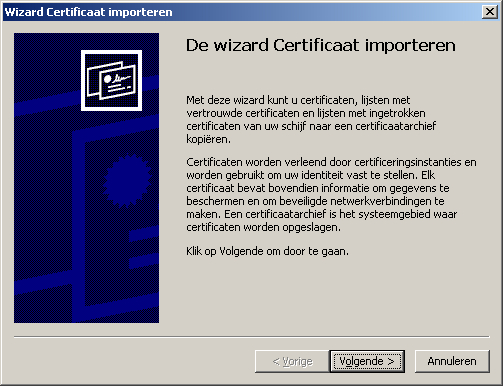
In het venster Certificaten klik je op Importeren.

certsrv_ie03

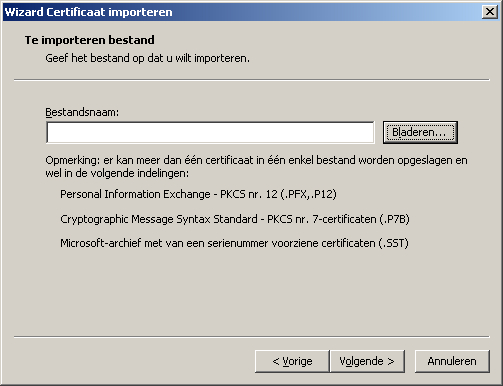
Klik op volgende en selecteer Bladeren.

certsrv_ie04

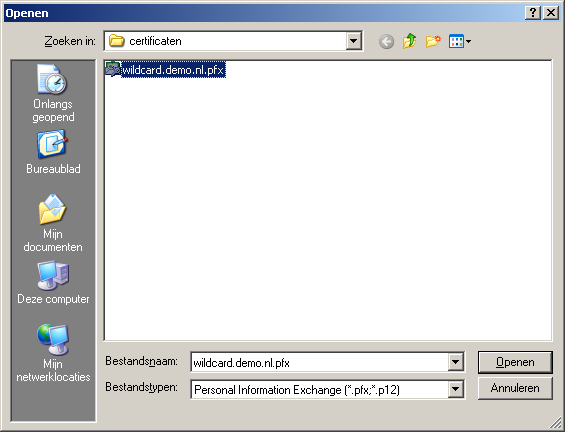
Blader naar de map waar de SSL certificaten staan. Verander eventueel bij Bestandstypen de juiste extensie.
In ons geval hebben we de klantnaam even aangepast naar wildcard.demo.pfx, dit zal normaal iets zijn als *.uwbedrijfsnaam.pfx.

certsrv_ie05

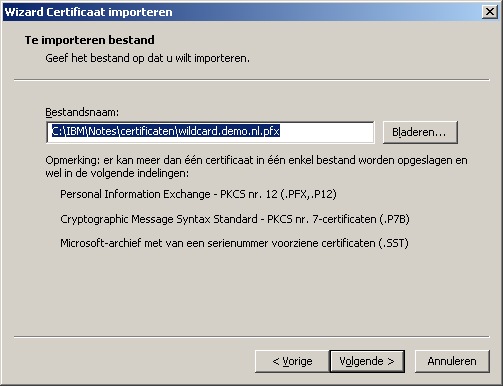
Open het bestand.

certsrv_ie06

Klik op volgende.

certsrv_ie07

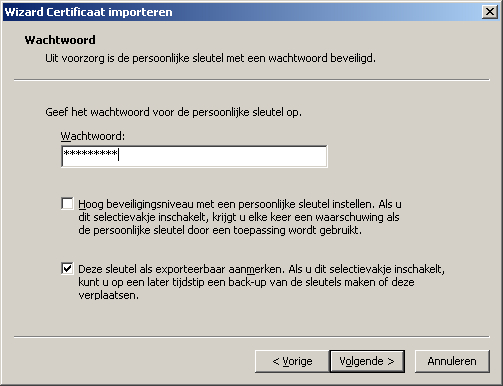
Geeft het wachtwoord op dat bij de sleutel hoort en zet eventueel een vinkje bij “Deze sleutel als exporteerbaar aanmerken.” en klik op volgende.

certsrv_ie08

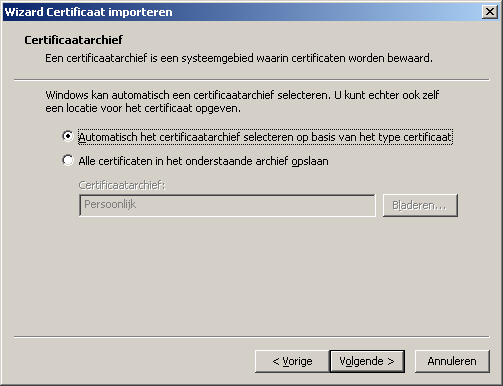
Klik op volgende of pas eerst de archief locatie aan indien deze niet goed staat.

certsrv_ie09

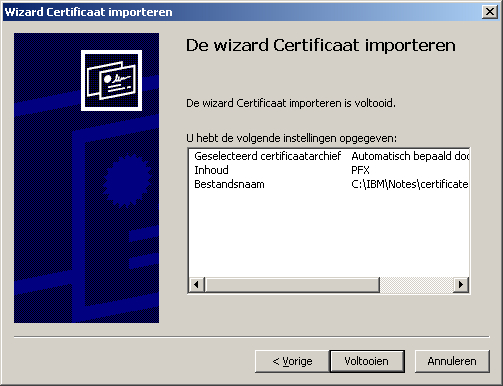
Controleer de inhoud en klik op Voltooien.
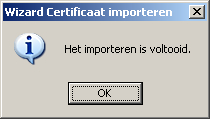
Als het goed is komt er een melding dat het importeren voltooid is. Klik daar op OK.

certsrv_ie10

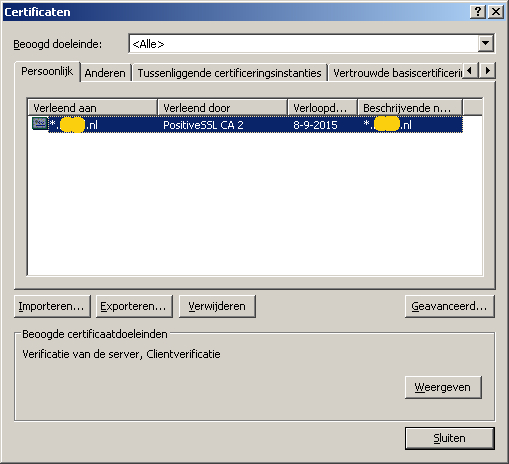
Als het goed is zal in het venster Persoonlijk uw certificaat staan. In ons geval is de klantnaam doorgestreept.

certsrv_ie11

Wanneer de import gelukt is kan er gekozen worden voor Persoonlijk -> Certificaten en klik vervolgens op het geïmporteerde wildcard certificaat.

Klik op het Certificaat tabblad.

Selecteer het intermediair certificaat en klik details.

Klik in het nieuwe venster op details en selecteer kopieer naar bestand.

Exporteer het intermediair certificaat als een Base-64 encoded X.509 cer bestand.

Als er meerdere intermediair certificaten zijn dan dienen deze ook op de zelfde manier geexporteert te worden.

Selecteer het certificaat opnieuw en exporteer het root certificaat naar een Base-64 cer bestand.

Open het geexporteerde intermediair en root certificaat bestand met een tekstverwerker als Notepad++

Open ook met Notepad++ de private key en certificaat informatie van het wild card certificaat uit het pem bestand.

kopieer achter de tekst van het pem bestand de tekst van het intermediair certificaat/certificaten en als laatste de tekst van van het root certificaat, en sla de gecombineerde tekst op als server.txt

Nu kan de informatie in server.txt gecontroleerd worden door het programma kyrtool.
Het programma zal rapporteren of de informatie over de certificaten correct is en in de juiste volgorde staat.

Open een command prompt (cmd) en navigeer naar het pad waar kyrtool.exe staat en gebruik het kyrtool verify commando op de volgende manier:

kyrtool verify c:\cert\server.txt

Verzeker je er van dat er geen foutmeldingen gemeld worden en dat de laatste regel aangeeft dat het certificaat self signed is (alle root certificaten, zelfs afkomstig van CA’s are self signed)

Als er geen fouten zijn geconstateerd kan er een nieuw key ring bestand gemaakt worden door kyrtool create -k -p commando, bijvoorbeeld: e,g

kyrtool create -k c:\cert\keyring.kyr -p aneasypassword

Dit commando genereert ook het stash bestand voor de keyring, wat noodzakelijk is voor Domino. Het bestand heeft de zelfde naam als het key ring bestand, maar heeft een .sth extentie.

Als deze stap zonder foutmeldingen is uitgevoerd kan de kyrtool gebruikt worden om de gegevens uit het server.txt bestand te importeren in het key ring bestand.
gebruik hiervoor het commando kyrtool import all -k -i, bijvoorbeeld:

kyrtool import all -k c:\cert\keyring.kyr -i c:\cert\server.txt

Als deze stap correct is uitgevoerd kan er van de bestaande key ring bestanden van de server (.kyr and .sth) een reserve kopie gemaakt worden zodat in het geval van een fout de huidige bestanden terug gezet kunnen worden.

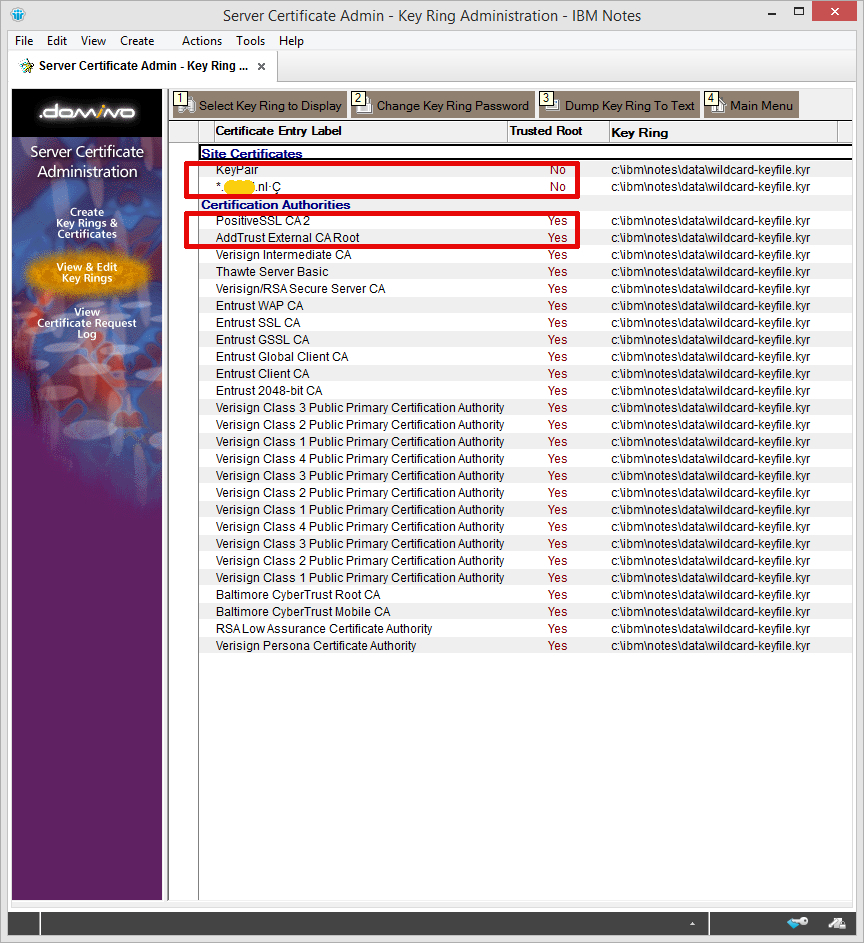
Om zeker te zijn dat Domino de sleutels kan lezen kunnen we deze nogmaals openen in IBM Notes met de “Server Certificate Admin” applicatie. Deze stap is optioneel natuurlijk.

Klik daarvoor in link in het menu op “View & Edit Key Rings”
Kies boven in het menu voor de knop “Select Key Ring to Display”

Type het volledige pad in naar het sleutelringbestand dat we in de eerdere stappen hebben gemaakt en aangepast.
Geef het wachtwoord in en klik OK.
Als alles goed is gegaan zien we nu bij Site Certificates een KeyPair en ons persoonlijke certificaat.
Bij Certificate Authorities moeten het root- en intermediate certificaten staan die we eerder hebben geïmporteerd.

certsrv_ie17
Als dit klopt kunnen we het *.kyr en bijbehorend *.sth bestand kopiëren naar de data map van de Domino Server.

In de configuratie van de Domino server dient de naam van het sleutelbestand natuurlijk overeen te komen met de bestandsnaam.

Herstart de HTTP taak en als het goed is heb je een werkend SSL certificaat. Controleer dit eventueel door op de Domino console het commando “Tell HTTP show security” in te geven.

Als alles zonder fouten is gelukt kunnen de tijdelijke bestanden van op het lokale werkstation verwijderd worden (om eventueel misbruik te voorkomen).

Mocht je er ondanks deze instructies niet uitkomen kun je altijd contact met ons opnemen. Of plaats je reactie onder dit bericht.

INECO Mooieweg 184 Arnhem

Verhuizing

Door onze verhuizing zijn wij per 10 juni 2016 niet langer meer gevestigd in Heteren.

Vanaf 29 juli 2016 is ons adres:

Mooieweg 184, 6836AL Arnhem

In de tussenliggende periode waar wij ons bezig houden met verhuizen en verbouwen is het niet mogelijk om ons kantoor te bezoeken.

Vanaf 29 juli 2016 bent u van harte welkom op onze nieuwe locatie!


SSLException: Could not generate DH keypair

Bij een klant had ik een Domino agent gemaakt met behulp van Java om gegevens uit te wisselen tussen Domino en AccountView via https.

Om dit goed te laten werken was Domino voorzien van de laatste JVM patches.

Afgelopen week had de beheerder echter de server waarmee de agent verbinding maakte voorzien van een nieuw wildcard SSL certificaat met een hogere versleuteling.
Hierna gaf de Java agent op de Domino server de volgende fout: javax.net.ssl.SSLException: java.lang.RuntimeException: Could not generate DH keypair.

Policy bestanden

Na wat zoeken op internet vond ik een artikel op de site van IBM waarbij gemeld werd dat de standaard JVM in Notes en Domino een restrictie hebben.

Op de site van IBM kunnen tevens twee policy bestanden, local_policy.jar en US_export_policy.jar worden gedownload waar die restricties niet op zitten.

Helaas bleek deze oplossing niet te werken bij de klant.

Bouncy Castle

Een ook bij de klant aanwezige software engineer had hiervoor echter wel een oplossing voor zijn softwarepakket dat ook voor Domino bleek te werken:

Op de site https://www.bouncycastle.org/ hebben we het bestand bcprov-ext-jdk15on-153.jar gedownload. (De Bouncy Castle Crypto package is een Java-implementatie van cryptografische algoritmes)

Vervolgens heb ik dit bestand in de map c:\IBM\Domino\JVM\lib\ext geplaatst.

In de map c:\IBM\Domino\JVM\lib\security het bestand java.security  aangepast:
security.provider.1=com.ibm.jsse2.IBMJSSEProvider2 veranderd in security.provider.10=com.ibm.jsse2.IBMJSSEProvider2.

Vervolgens de regel security.provider.1=org.bouncycastle.jce.provider.BouncyCastleProvider toegevoegd en het bestand opgeslagen.

Na het herstarten van de Domino server werkte de agent weer.

Fijn Harry (G), bedankt…


rcplauncher.properties

HCL Notes workspace map per gebruiker

Dat je met HCL Notes per gebruiker een eigen data map kunt instellen door middel van de notes.ini is natuurlijk bekend bij iedereen.

Maar de Workspace map blijft zonder aanpassingen gedeeld voor gebruikers die aanmelden op de zelfde computer.
Laatst bleek dat weer eens bij een klant die een Remote Desktop sessie naar een beheer server maakte waar ook al iemand anders op aan het werk was.

Om ook de Workspace map te verwijzen naar een eigen locatie dient het bestand rcplauncher.properties aangepast te worden.
Dit bestand staat in de map waar de HCL Notes programma bestanden zijn geïnstalleerd en dan in de submap \framework\rcp.

rcp.data

Op een standaard Windows machine zou dat C:\Program Files\HCL\Notes\framework\rcp\rcplauncher.properties zijn.
De regel waar de locatie van de Workspace map staat is rcp.data=c\:/Program Files/HCL/Notes/Data/workspace

Pas deze regel aan zodat de workspace map in de zelfde map komt te staan als de gebruikers dat map.

Stel dat in de notes.ini de regel Directory=x:\HCL\Notes\Data staat, dan kan in rcplauncher.properties de regel rcp.data=x\:/HCL/Notes/Data/workspace worden.

Variabelen

Het is mogelijk om variabelen te gebruiken in het rcplauncher bestand. Zo kan de regel ook worden:
rcp.data=x\:/${env.USERNAME}/HCL/Notes/Data/workspace

Enkele voorbeelden van variabelen zijn:
${env.HOMEDRIVE}
${env.HOMEPATH}
${env.USERNAME}

Om deze locatie in te stellen tijdens een installatie is o.a. de parameter RCPDATA= beschikbaar:
setup.exe /v”SETMULTIUSER=1 CITRIX=1 MULTIUSERBASEDIR=x:\ MULTIUSERCOMMONDIR=x:\notes RCPDATA=x:\”

Meer informatie is ook te vinden:
Specifying custom data directories for multi-user install or upgrade

Notes installation directories for Windows