INECO-IBM-Domino-failover-SMTP-relay-host

Failover in Foreign SMTP Connection Document of Relay Host

Omdat het naar mijn mening niet echt heel helder staat beschreven in de IBM Domino documentatie een tip hoe je een SMTP failover/load balancing kunt realiseren met IBM Domino vanaf versie 6.

IBM geeft in de normale Domino Administrator Help het volgende aan:
For the field Relay host for messages leaving the local Internet domain enter the host name, domain name, or IP address of the server being used as a relay host keeping the following guidelines in mind:
A domain name is a valid entry only if the internal DNS contains an MX record for that domain and can resolve it to a host name.
When entering an IP address, enclose it within brackets; for example, [127.0.0.1].

Er is echter een technote die aangeeft dat vanaf versie 6 ook meerdere machinenamen/ip-adressen ingevoerd mogen worden:
http://www.ibm.com/support/docview.wss?uid=swg21217089

Using the Configuration Document to implement outbound SMTP failover

Question:
You must configure the Lotus Domino® server for outbound SMTP failover. In the Configuration Document –> Router/SMTP panel –> Basics panel, can the field, “Relay host for messages leaving the local internet domain,” contain multiple hostnames/IP addresses?

Answer:
This feature is available beginning with Domino 6 releases. Use a semi-colon to separate hostname entries or IP addresses to achieve failover.

Example: host1.acme.com;host2.acme.com

Result:
The router will attempt an SMTP transfer to host1.acme.com. If host1.acme.com is down or not responding, the router will failover to host2.acme.com as observed below:

09/13/2006 11:01:46 AM Router: No messages transferred to host1.acme.com;host2.acme.com (host host1.acme.com) via SMTP: The server is not responding. The server may be down or you may be experiencing network problems. Contact your system administrator if this problem persists.
09/13/2006 11:01:46 AM SMTPClient: Attempting to Connect: Host host2.acme.com, Port 25, SSL Port 0, Connecting Domain vec.lotus.com
09/13/2006 11:01:46 AM SMTPClient: Connection successful

Nu kreeg ik direct een foutmelding dat de remote server niet gevonden kon worden.
Vandaar een zoektocht naar meer informatie.

Op Slideshare vond ik de volgende IBM presentatie:
https://www.slideshare.net/jayeshpar2006/important-tips-on-router-and-smtp-mail-routing

How to make Domino relay server to route mail to mutiple SMTP hosts
Within the Domino “Relay host” field, two list delimiters are allowed – comma( , ) and semicolon( 😉
● Method 1: Load balancing mode : host1, host2
In this example, the router will take the group of hosts at the
same preference level (host1 and host2) and try to connect to
these hosts in a random order.
● Method 2: Fail over mode : host1; host2
In this example, the router will take preference of first host
(host1) to route emails. If host1 stops responding, then the
Domino router will move on to the next host (host2) i.e the next
preference level.

Zie ook:
Configuring Domino to send mail to a relay host or firewall

The internal mail servers can route Internet mail to the server with SMTP enabled for external mail either via IBM® Lotus® Notes® routing, with a Foreign SMTP Domain document and SMTP Connection document linking to the SMTP server, or via SMTP routing, with the SMTP server configured as the relay host.

Configuring these servers requires:

  • Enabling “SMTP used when sending messages outside of the local Internet domain” for Mail1 and Mail3.
  • Enabling the SMTP listener task for Mail1 and Mail3.
  • Setting up DNS correctly to include MX records for Mail1 and Mail3, indicating to external SMTP systems that these are the hosts that receive inbound mail for the acme.com domain.
  • Either enabling “SMTP allowed outside of the local Internet domain” for the internal mail servers, Mail2 and Mail4, and listing Mail1 or Mail3 as the relay host, or creating a Foreign SMTP Domain document and SMTP Connection document that define the route to Mail1 or Mail3.

Het leek mij logisch dat als je 1 IP-adres moet noteren in blokhaken, je twee IP-adressen gescheiden door een comma of puntcomma dan als volgt zou invoeren: [10.10.1.4],[10.10.1.6]
Dit werkte echter niet.

Na weer wat zoekwerk op internet vond ik een ouder document uit 2011:

Open Mic Session “Best Practices, Configuring and Troubleshooting SMTP mail routing” – 9 June 2011

Question:
Can we configure multiple IP to Domino outbound SMTP server ?

e.g.- 10 IP to send out the mails so that mail transfer will be faster by 10 times.

Answer:
You can configure multiple IP addresses in the relay host field in the Configuration Document for the Lotus Domino® server. (Configuration Document –> Router/SMTP panel –> Basics –> Relay host for messages leaving the local internet domain ).

You can use multiple IPs by separating with a comma or a semi-colon as the separator between IP addresses in the relay host field in the Configuration Document, or if using brackets then add a second bracket to the first IP address as given example below.

Note:
Don’t use brackets around or spaces within the IP address configuration.

Use:
10.10.1.4,10.10.1.6
or
10.10.1.4;10.10.1.6
or
[[10.10.1.4],[10.10.1.6]

In ons geval moest er dus een extra blokhaak voor het eerste IP-adres!

Deze load balancing methode werkt overigens op meer plaatsen volgens de laatste link:

Question:
I am using 3 gateways for out going mails is it possible that i can configure load balancing?

Answer:
You can use a comma to separate the IP addresses of your gateways. Comma will give you load balancing while semicolon will give you failover. Specify the IP addresses like this x.x.x.x, y.y.y.y, z.z.z.z .

(Weer een andere notatie, of toch met [] of [[]?)

IBM Connect 2017, geen einddatum Notes in zicht, ondersteuning blijft

Het was al eerder bekend gemaakt, maar op IBM Connect is nogmaals bevestigd dat er geen einddatum gepland staat voor Notes en Domino 9.0.
De normale ondersteuning van deze versie gaat door tot minimaal 2021 en de extra betaalde ondersteuning tot minimaal 2024.

Er zijn nog steeds klanten die af en toe horen dat ondersteuning stopt, Notes dood is, en dat soort verhalen.
Wij zien dat mede door dit soort geruchten dat bedrijven bang zijn om te investeren in hun Domino omgeving.
En daardoor neemt het aantal gebruikers in Nederland wel af.
Toch is het onterecht om zo’n mooi product te laten vallen, zeker als IBM het product blijft verbeteren en moderniseren!

Bron: Ed Brill op https://www.ibm.com/blogs/social-business/2017/03/09/ibm-notes-domino-product-update-connect-2017/

Extended Support:

Notes/Domino 9.0 shipped in 2013, and IBM’s normal five-year support model meant that mainstream support could have ended in 2018. However, we know how important these products are to your business, and we are continuing to invest in new functionality. For IBM Notes/Domino 9.0, we have announced that product support will be extended through at least 2021, and extended support through at least 2024. There is no end of life planned for Notes and Domino, and we will continue to update the timeline for support as appropriate based on future releases and market requirements.

Domino / Notes support contract?

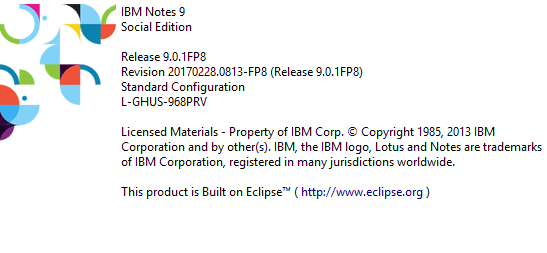
Feature Pack 8 voor Domino / Notes Social Edition 9.0.1 is uit

Met ingang van “Fix Pack” 8 voor Domino / Notes 9.0.1 is ook de naam aangepast naar Feature Pack.

Naast een aantal belangrijke fixes zijn er ook nieuwe mogelijkheden toegevoegd.
Een aantal zoals het automatisch verversen van niet alleen de eigen postbus, het verwijderen van views uit de nsf,  het gebruik van een nieuwere Java omgeving en het tonen van het e-mailadres i.p.v. het Notes adres in mail en agenda zijn toch opmerkelijke verbeteringen.

Zie het complete Engelstalige document hier: Notes/Domino Fix List

Linux

Opmerkelijk en minder leuk is het niet langer meer ondersteunen van de Notes Client op Linux.
Nu moet ik eerlijkheidshalve toegeven dat het best lastig was om dit op bepaalde distributies te laten werken.
Persoonlijk vind ik dit wel erg jammer.

Download

Feature Pack 8 is te downloaden via de Fix Central IBM site.


Bijlage zoeken in DAOS

Koppeling DAOS en Notes Document achterhalen

Vandaag werd de vraag gesteld hoe je kunt achterhalen welk NLO (Notes Large Objects) bestand bij welk document in een Notes database met DAOS ingeschakeld hoort.

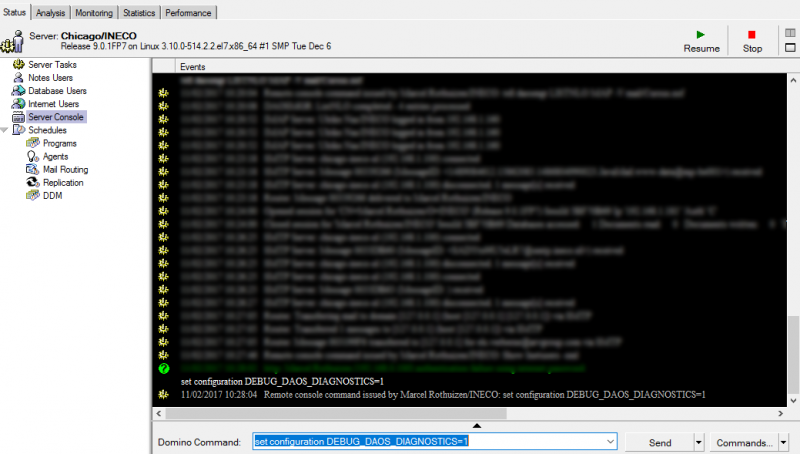
Begin met op de Domino server console het volgende commando te geven:
set configuration DEBUG_DAOS_DIAGNOSTICS=1

Hierdoor zijn er extra parameters beschikbaar zodat er een lijst met documenten en hun bijlagen kan worden opgeslagen in de Domino data map.
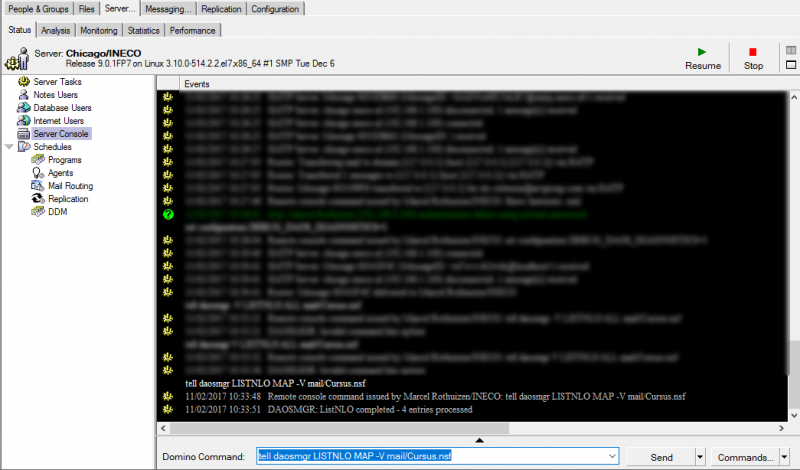
Gebruik daarvoor het volgende commando:
tell daosmgr LISTNLO MAP -V mail/Cursus.nsf
(waarbij mail/Cursus.nsf vervangen dient te worden voor de database die je wilt controleren)

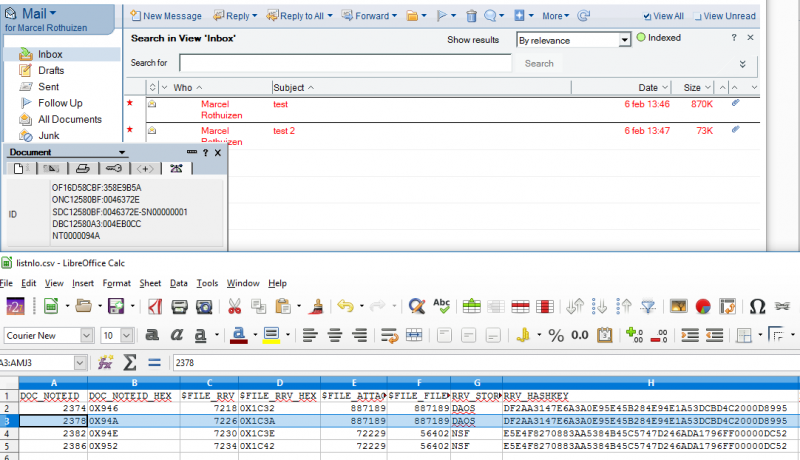
In de Domino data map staat vervolgens het tekstbestand listnlo.txt dat met behulp van bijvoorbeeld Excel of LibreOffice Calc eenvoudig geïmporteerd kan worden.

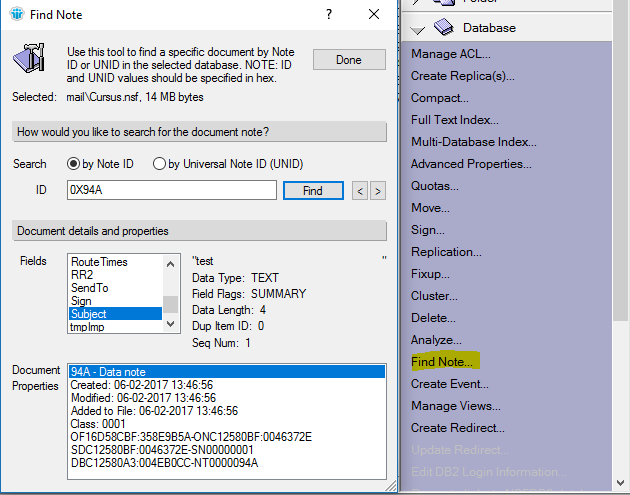
Om te zoeken met het Notes document als sleutel kan middels de info dialoog het NoteID bekeken worden. Met dit gegeven kan in de lijst gezocht worden. In dit geval noteID NT0000094A converteren zonder NT naar decimaal is 2378 en dit nummer is te vinden in de lijst.

Nu is het nummer van het NLO bestand te achterhalen in de kolom RRV_HASHKEY.
Dit nummer kan door middel van een zoekopdracht in de DAOS mappen als het goed is worden gevonden.

Wil je iets gerichter zoeken kan nog op de Domino server console het commando tell daosmgr LISTNLO ALL mail/Cursus.nsf gegeven worden.
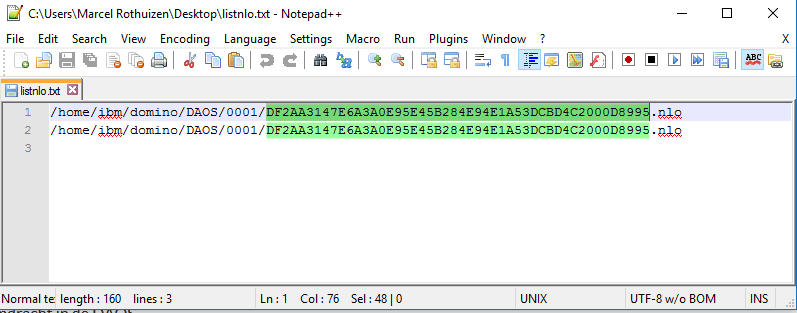
Dit maakt wederom een listnlo.txt (vorige even veilig stellen). Deze lijst is slechts een lijst met alle NLO bestanden, maar geeft wel het volledige pad weer.
Zoek je nu in deze lijst de eerder gevonden RRV_HASHKEY op zal duidelijk worden waar het bestand staat.

Om middels het NLO bestand te achterhalen welke documenten er gebruik van maken kan er gezocht worden op NoteID door middel van de Domino Administrator client:

Overigens zijn NLO bestanden versleuteld met het server ID van de server waarop de DAOS taak het NLO bestand heeft aangemaakt.
de NLO bestanden kunnen daarom alleen op die server weer geopend worden. Stel een database staat op serverA en op serverB, en beide servers hebben DOAS aan staan, zal een bijlage in de NSF resulteren in een NLO bestand op beide servers met de zelfde naam.

Versleuteld

Toch is dit NLO bestand niet uitwisselbaar op deze servers vanwege de verschillende server ID’s waarmee de NLO bestand is versleuteld.
Het versleutelen van NLO bestanden kan eventueel wel uit worden gezet door middel van de notes.ini regel DAOS_ENCRYPT_NLO=0 of in latere versies van HCL Domino door de instelling in het server document.


Dit heeft echter geen effect op reeds bestaande NLO bestanden, hiervoor zou DOAS eerst uitgeschakeld en daarna weer ingeschakeld moeten worden (diskruimte!).
Het uitschakelen van de encryptie heeft als voordeel dat bestanden uitwisselbaar worden (en een back-up kleiner kan zijn) maar is minder veilig.

Voor latere versies van Domino met DAOS waar FIX GFAL9AKKJZ is toegepast is het mogelijk om via de doasmgr bestanden te decrypten met het server.id dat gebruikt is voor het encrypten op een andere server, en eventueel het bestand weer encrypten met het nieuwe server.id.
Syntax:
DAOSMGR NLOENCRYPTION [ENCRYPT | DECRYPT | VALIDATE] <path to single NLO file>|

Voordat bovenstaande commando uitgevoerd wordt is het verstandig om een back-up te maken van de NLO bestanden. De actie past de headers van  de NLO bestanden en kan deze mogelijk beschadigen als er tijdens de actie iets mis gaat!

Om NLO bestanden te kunnen gebruiken op een andere server dan waarmee ze versleuteld zijn dient de lokatie van het origine server.id in de notes.ini opgegeven te worden achter de volgende instelling: DAOS_ENCRYPTION_ALTERNATE_SERVER_ID=
Het server.id mag geen wachtwoord hebben. (Als alternatief kan het decrypten op de originele server plaats vinden en daarna pas naar de nieuwe server worden verplaatst.)

Het commando DAOSMGR NLOENCRYPTION [ENCRYPT | DECRYPT | VALIDATE] kan dus werken op een enkel bestand, maar zonder opgave van een bestandsnaam zal het werken op alle NLO bestanden die bekend zijn in de DAOS catalog.
Ook kan er een IND bestand als parameter worden gebruikt.
In het IND bestand dienen de complete paden naar de NLO bestanden te staan bijvoorbeeld:
c:\daos\0001\73564238A14ACBE6F3D28713A3228071C931E1C4001A0EA8.nlo
c:\daos\0002\73564238A14ACBE6F3D28713A3228071C931E1C4311A0EA9.nlo

Notitie:

Wat mij nog niet duidelijk is hoe de bijlage nu daadwerkelijk uit een NLO bestand gehaald zou kunnen worden. Wanneer bestanden ge-decrypt zijn lukt het vaak bij afbeeldingen e.d. om deze direct te tonen, echter Excel bestanden e.d. zien de DAOS header in het bestand en willen daarom niet goed openen.
Hoe die header verwijderd zou kunnen worden om het bestand weer toegankelijk te maken zou ik graag willen weten. Hierdoor zou het ook mogelijk moeten zijn om zonder het originele Notes document toch de bijlage te kunnen redden.

Om de Domino server de NLO bestanden te laten controleren kan de notes.ini regel
DAOS_RESYNC_VALIDATE_NLO_FILES=1 worden toegepast.

Zet de waarde 1 om validatie in te schakelen en 0 om deze uit te zetten. Standaard is 0 (uit).


De Workspace instellen als standaard homepage bij uitrollen Notes 9.0.1

Voor klanten die bij een uitrol van nieuwe IBM Notes 9.0.1 werkplekken standaard de Workspace willen tonen zal er een kleine aanpassing gemaakt moeten worden aan de Bookmark.ntf.
Om de Bookmark.ntf aan te passen voor alle gebruikers:

In Notes 9.0.1

1. Start de Domino Designer client.
2. Open het Bookmark.ntf database sjabloon.
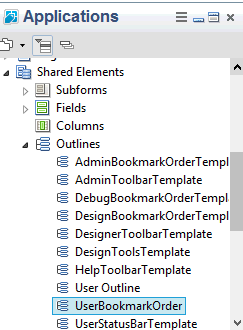
3. Klap de Shared Elements categorie aan de linker kant uit, en daarna Outlines uitklappen

4. Scroll naar beneden in de Outlines lijst en klik op  “UserBookmarkOrderTemplate”. De outline zal in het rechter venster openen.
5. Selecteer Design > Outline Properties. Hernoem de outline naar “UserBookmarkOrder” (ofwel verwijder het “Template” deel uit de naam).

6. Selecteer File > Save in het Designer menu.
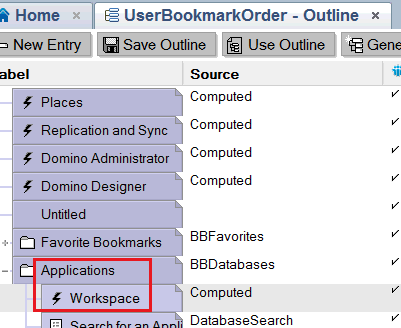
7. Klap de Applications outline open.
8. Selecteer  de Workspace regel.

9. Wees er zeker van dat de InfoBox veranderd van Outline properties naar Outline Entry properties (of, als je eerder de InfoBox sloot deze opnieuwe opent door Design > Outline Entry Properties te kiezen). Ga naar het tweede tabblad (“shade” icoontje).
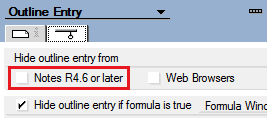
10. Houd de SHIFT ingedrukt en klik op ‘Hide Outline Entry From’ property labeled ‘Notes 4.6 or Later’.

Opmerking: Het gelijktijdig ingedrukt houden van de Shift en het klikken op de ‘hide option’ zal van deze outline (Workspace) de standaard bookmark maken!

11. Laat de SHIFT toets los .
12. De-selecteer de ‘Hide from’ eigenschap ‘Notes 4.6 or Later’.
13. De beheerder kan nu het sjabloon uitrollen bij elke gebruiker (door het sjabloon klaar te zetten bij de eerste keer starten van Notes of door bij bestaande gebruikers een database replace design uit te voeren op Bookmarks.nsf voor bestaande gebruikers)

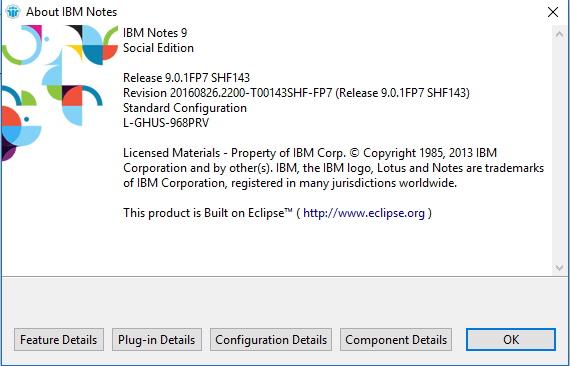
Notes 9.0.1 Fix Pack 7 Interim Fix 1 (29 november 2016)

Notes 9.0.1 Fix Pack 7 Interim Fix 1 is uitgebracht op 29 november 2016.
Deze interim fix is te downloaden op de volgende pagina van IBM:
http://www.ibm.com/support/docview.wss?uid=swg21657963

De interim fix voor de Notes Client lost twee zaken op waarvan zeker de eerste bij een aantal van onze klanten problemen veroorzaakte:
RGAUADUM59

Duplicate attachment icons when using Lotusscript embedobject to attach files to a NotesRichTextItem

BBSZAEEK8C

Notes user ID file upload to vault failed if port_enc_adv parameter is enabled

De omschrijving ‘Duplicate attachment icons’ is wat voorzichtig, de bijlage bleek in veel gevallen ook daadwerkelijk twee keer aanwezig.
Dit kon veroorzaakt worden door gebruik van Lotusscript, maar ook de mail/sendto API had er last van. 

Zie ook Fixpack 7 voor Domino/Notes 9.0.1 is uit.


Golden 20-year anniversary emblem

Jubileum: INECO alweer twintig jaar actief

Het is alweer twintig jaar geleden dat INECO is ingeschreven als bedrijf bij de KvK in Arnhem.

En nog steeds werken wij voornamelijk aan opdrachten op het gebied van IBM Notes ontwikkeling en IBM Domino beheer!

Startdatum onderneming: 01-11-1996
Ondernemingsactiviteit:

Ontwikkelen, produceren en uitgeven van software, advisering en ondersteuning op het gebied van informatietechnologie, beheer van computerfaciliteiten en overige dienstverlenende activiteiten op het gebied van informatietechnologie.

Golden 20-year anniversary emblem

Activiteiten:

SBI-code: 6201 – Ontwikkelen, produceren en uitgeven van software

Ontwikkelen, produceren en uitgeven van software
Deze klasse omvat: – ontwikkelen, produceren en uitgeven van standaardsoftware standaard apps; – ontwikkelen, aanpassen, testen en ondersteunen van maatwerksoftware en van computerprogramma’s; – customising van software; – applicatiebeheer; – bouwen van websites: ontwikkelen en programmeren van websites.

SBI-code: 6202 – Advisering en ondersteuning op het gebied van informatietechnologie

Advisering en ondersteuning op het gebied van informatietechnologie Deze klasse omvat: – consultancy, advisering op het gebied van hard- en software; – ontwikkelen, samenstellen, programmeren van gebruiksklare systemen, integratie van hard- en software en communicatie technologie; – allround automatiseringsbureau’s; – auditing, trouble shooting, testen op het gebied van ICT; – advisering op het gebied van telecominfrastructuur; – advisering en ondersteuning op het gebied van beveiliging van software, informatiesystemen en data, zoals het uitvoeren van vulnerability (kwetsbaarheids-) en penetratietests (pentests), webapplication en infrastructuur scanning, het verrichten van code en server audits, risicoanalyses; – het bepalen van een securitystrategie, in kaart brengen van cybersecurity en bedrijfscontinuïteitsrisico’s, access en identity management; – beveiligen van computers en netwerken: computer- en networksecurity. Deze klasse omvat niet: – ontwikkelen van antivirus software en virusscanners (6201).

SBI-code: 6203 – Beheer van computerfaciliteiten

Beheer van computerfaciliteiten Deze klasse omvat: – systeem- en netwerkbeheer (-management).

SBI-code: 6209 – Overige dienstverlenende activiteiten op het gebied van informatietechnologie

Overige dienstverlenende activiteiten op het gebied van informatietechnologie Deze klasse omvat: – implementatie en installatie van software; – conversiediensten; – “computerreparatie” voor zover het de software betreft; – beveiligen van computers en netwerken: computer- en networksecurity ; – data-recovery; – overige dienstverlening op het gebied van automatisering voor zover deze activiteiten niet elders zijn genoemd.

Naambord aan de straat

Onze locatie

INECO heeft een eigen kantoorruimte in een deel van ons woonhuis aan de Mooieweg 184 in Arnhem.

Van der Vet

Onze woning is in 1996 ontworpen door architect A.J. van der Vet in opdracht van Dhr Eskes.
Voor zo ver wij kunnen nagaan is A.J. van der Vet o.a. bekend als uitvoerend architect van Het Dorp in Arnhem, de eerste aangepaste wijk voor mensen met een beperking in Nederland.
In 1997 is deze woning gebouwd aan de rand van de, toen net nieuwe wijk Rijkerswoerd, door Kuijpers Bouw uit Heteren.

Het idee was blijkbaar om een soort Spaanse haciënda te bouwen, getuige de afbeelding van de maquette.

INECO Mooieweg 184 maquette

Stadsontwikkeling Arnhem

De toenmalige dienst Stadsontwikkeling Arnhem vond dat echter niet passen in de omgeving.
De woning is uiteindelijk wel in een soortgelijke vorm gebouwd, echter met gewone bakstenen en antraciet kleurige dakpannen (verplicht door de gemeente).
Eind juli 2016 hebben wij deze woning van de familie Eskes gekocht.

Apache of IIS als Reverse Proxy voor Domino

Gisteren bij een klant een Domino server voorzien van een wildcard SSL certificaat.
Klant heeft meerdere (sub)domeinen maar slechts 1 publiek IP-adres.
Voor sites draaiend op HTTP geen enkel probleem, maar zelfs in versie 9 van Domino is het nog steeds niet mogelijk om meerdere SSL sites op 1 IP-adres te configureren.
Ik ben echt een groot liefhebber van IBM en Domino/Notes in het bijzonder, maar dat simpele dingen zoals dit nog steeds niet kunnen vind ik echt een misser!

Notitie:

De oplossing in dit bericht kan nog steeds werken, maar is met de komst van Domino V11.0.1 niet meer actueel: INECO – Vanaf HCL Domino V11.0.1 ondersteunt de Domino webserver Server Name Indication (SNI)

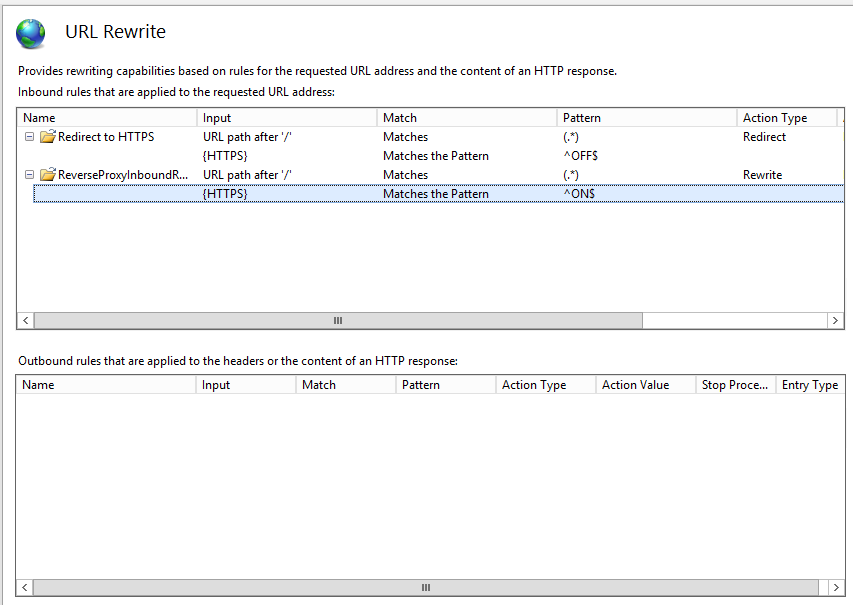
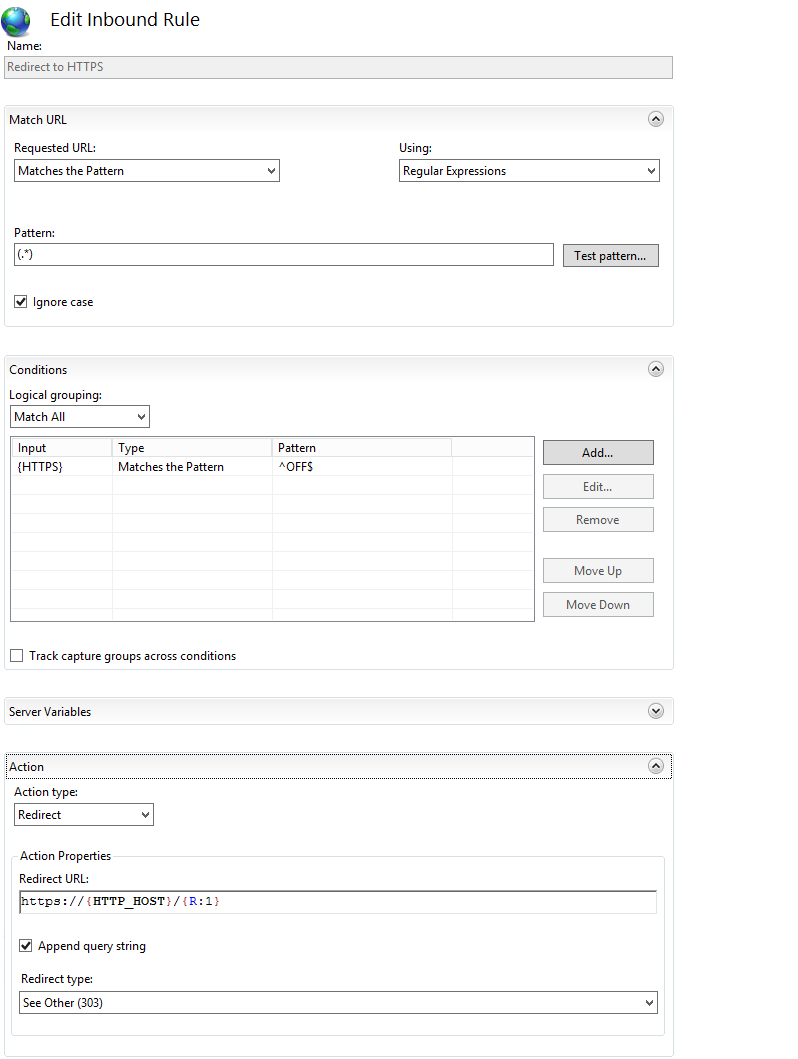
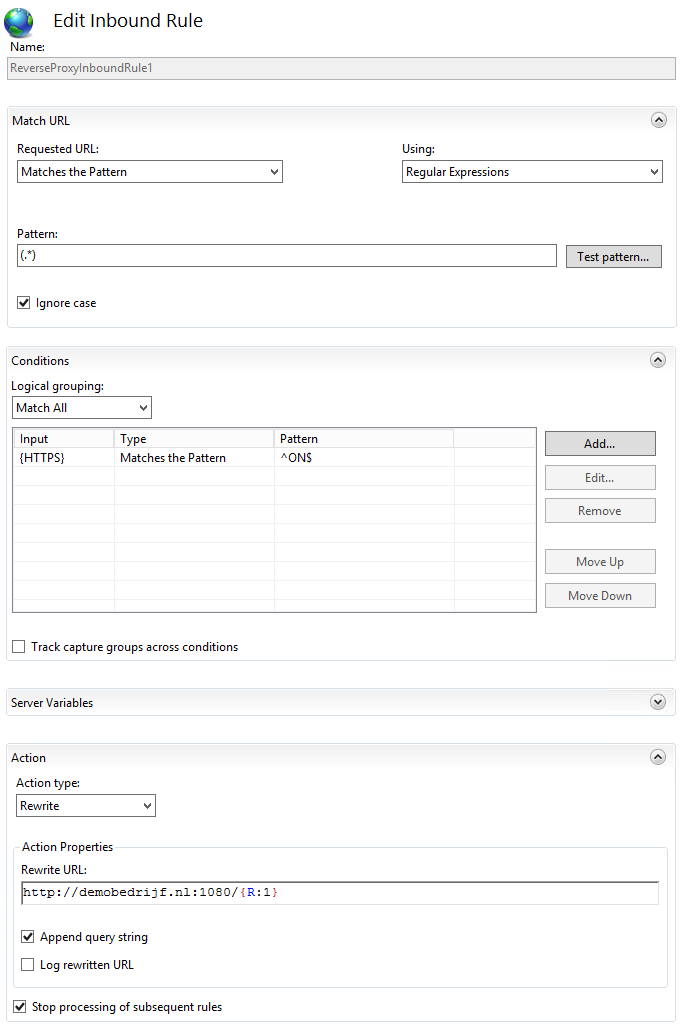
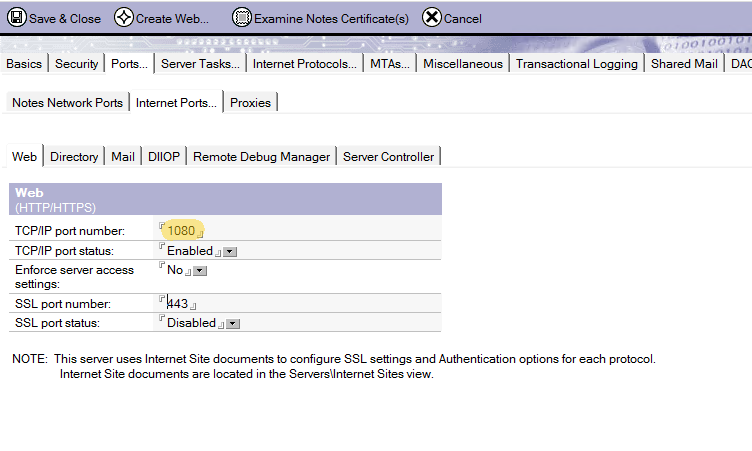
Meestal plaats ik er dan maar een Apache HTTP of Microsoft Internet Information Services (IIS) server als Reverse Proxy voor (vaak op de zelfde machine), configureer de SSL sites en stuur ze intern door naar Domino via http op een andere poort, bijvoorbeeld poort 1080, zodat IIS of Apache op poort 80 een 443 kan draaien.
In zowel Apache HTTP als IIS servers is het geen probleem om meerdere SSL/HTTPS sites aan 1 IP-adres te koppelen.

IIS

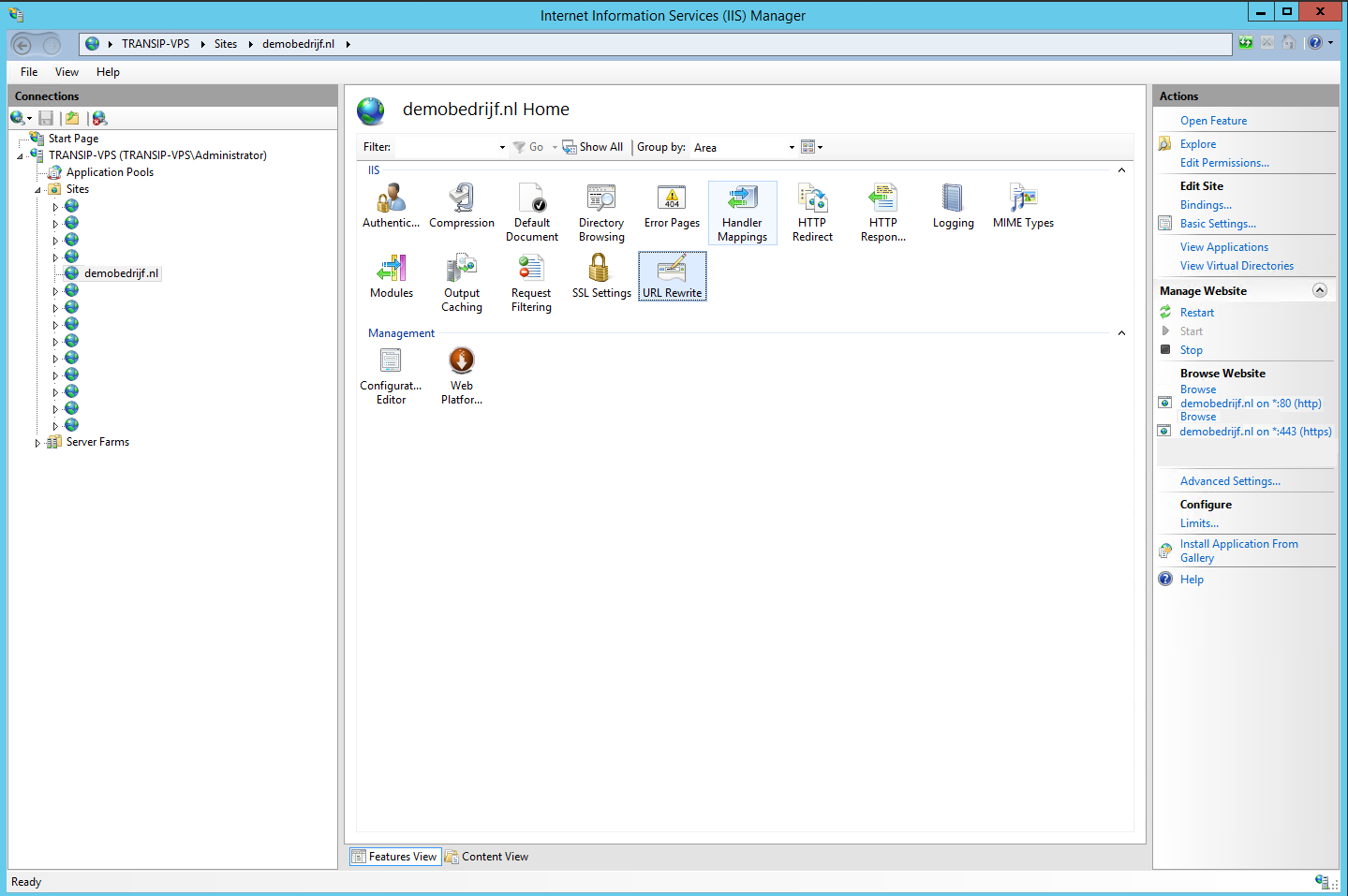
Voor IIS 8 ziet het er dan als volgt uit:
iis_rewrite01

iis_rewrite02
iis_rewrite03

iis_rewrite04

Apache

Voor Apache zijn er ook wel mooie interfaces, maar een tekstverwerker is snel en werkt ook prima:

<VirtualHost *:80>
ServerName demobedrijf.nl
RewriteEngine On
RewriteRule ^(.*)$ https://%{HTTP_HOST}$1 [R=301,L]
</VirtualHost>

<VirtualHost *:443>
ServerName demobedrijf.nl
SSLEngine on
SSLProtocol ALL -SSLv2 -SSLv3
SSLCipherSuite ALL:!aNULL:!ADH:!eNULL:!LOW:!EXP:!RC4+RSA:+HIGH:+MEDIUM
SSLCertificateFile “C:/Program Files/Apache/conf/ssl/star_ demobedrijf_nl.crt”
SSLCertificateKeyFile “C:/Program Files/Apache/conf/ssl/star_ demobedrijf_nl.key”
SSLCertificateChainFile “C:/Program Files/Apache/conf/ssl/Comodo_PositiveSSL_bundle.crt”
ProxyPass / http://demobedrijf.nl:1080/
ProxyPassReverse / http://demobedrijf.nl:1080/
</VirtualHost>

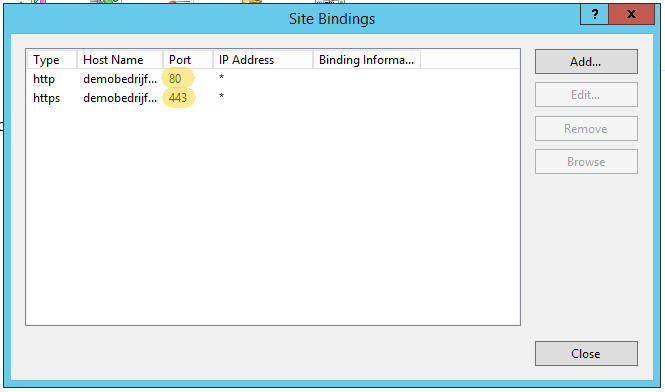
De webserver die als Proxy fungeert  luistert dan naar poort 80 en 443.
iis_bindings

En Domino staat ingesteld op  bijvoorbeeld poort 1080.

domino_bindings

Doordat de reverse proxy server intern via het gewone HTTP protocol verstuurd zal Domino geen probleem hebben om het juiste website document te koppelen aan het verzoek.


Fixpack 7 voor Domino/Notes 9.0.1 is uit

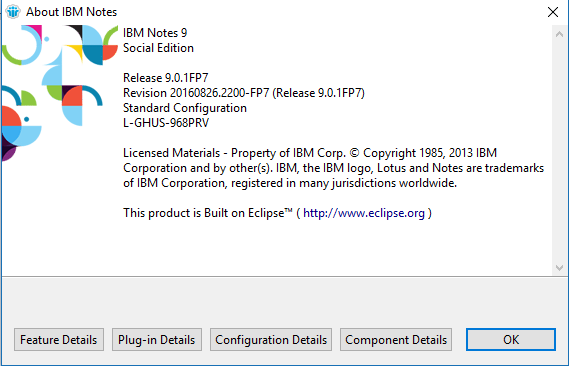
Fixpack 7 voor Domino en Notes 9.0.1 is beschikbaar op de IBM support sites.  

ibm-notes-901-fp7

Waarschuwing:

08-10-2016:
Na de installatie van FP7 op de Notes client kan het voorkomen dat bijlagen verstuurd vanuit de Windows Explorer (rechtermuis menu> Send to > mail recipient) zowel in de body als boven in de header van de mail komen.
Een tijdelijke oplossing is om bijlagen toe te voegen vanuit de mail met de bijlage toevoegen knop.

IBM Notes/Domino 9.0.1 Fix Pack 7 Release Notice

September 13, 2016

9.0.1 Fix Pack 7 is a collection of new features and low-risk, high-impact fixes to help customers safely avoid known issues. IBM strongly recommends that customers running Notes/Domino 9.0.1x upgrade to this latest Fix Pack since it adds new features and addresses a small percentage of defects that impact the broadest set of customers. Fix Packs are released periodically to provide a greater level of stability for customer environments. They go through the same level of fix, regression and interoperability testing that occurs with Maintenance Releases. Fix Packs are always cumulative and contain all of the fixes from previous ones. All Fix Packs are language independent and may be applied on any language version of Notes/Domino 9.0.1x.

Notes/Domino 9.0.1 Fix Pack 7 addresses defects in the Client, Server, Notes Browser Plug-in and Domino OpenSocial component.

Supersedes
9.0.1 Fix Pack 7 includes all of the content and supersedes the following deliverables:

Domino: 9.0.1 FP6 IF1, IF2, IF3

Important Notes

9.0.1 Fix Pack 7 updates the embedded Notes/Domino JVM to 1.6 SR16 FP30 to address security vulnerabilities.
9.0.1 Fix Pack 7 adds support for Citrix XenApp 7.7.
9.0.1 Fix Pack 7 adds the new features listed in technote 1990268 – New features and enhancements in Notes and Domino Fix Pack 7

Known Issues

If running IBM Traveler or IBM mail support for Microsoft Outlook on Linux 64-bit, you should upgrade those products to the latest releases available prior to upgrading to Domino 9.0.1 FP7. See technote 1990034 for details.

SPR XXLI9RNB7U – Windows Domino Server: JVM version is reverted to 9.0.1 gold’s version when un-installing/downgrading from a 9.0.1 Fix Pack to a prior Fix Pack. This will not impact most customers, as downgrading to a prior fix pack is not a common operation. This issue also does not affect future fix pack upgrades. DETAILS: On Windows, the Domino server installer gives you an option to downgrade to either a prior Fix Pack level or to the gold release. If customers want to downgrade to an earlier Fix Pack level, it is recommended that you un-install the Fix Pack, which will leave the server at 9.0.1 gold, then proceed with the Fix Pack install of your choice. This will ensure the correct JVM level is installed. This issue is documented in technote 1980538.

Download Options

For download options see technote 4037141 – “Download Options for Notes & Domino 9.0.1 Fix Packs”. Note: Fix Packs will not be distributed on physical media (DVD/CD). Active Subscription & Support is required to download Notes/Domino from Fix Central (see technote 1990043).

If you have Notes 9.0.1 Basic Configuration or Notes/Admin/Designer (Basic edition) 9.0.1 installed, use the Notes 9.0.1 FP7 Basic install.
If you have Notes 9.0.1 Standard Configuration or Notes/Admin/Designer (Standard edition) 9.0.1 installed, use the Notes 9.0.1 FP7 Standard install.

Note: IBM Notes Mac 9.0.1 32-bit is superseded by Mac 9.0.1 64-bit. Customers looking for a Notes Mac 32-bit client fix pack are encouraged instead to download and install Notes 9.0.1 Mac 64-bit. Passport Advantage part numbers can be found in this document: Supportability Q&A about IBM Notes and OS X 10.11.x

Decision to upgrade
Customers unable to upgrade to later Releases should install Fix Packs to benefit from later fixes made to the product. By providing a small number of fixes, customers are able to accept fewer code changes with lower risk, allowing them to “patch” an older Maintenance Release until a more extensive upgrade to the current Release is possible.

While Fix Packs provide important fixes and IBM strongly recommends applying the latest Fix Pack available for a Maintenance Release, IBM still recommends that customers upgrade to the latest Release + Fix Pack combination to receive the broadest set of fixes available. You will receive more overall fixes with a later Release + Fix Pack than with a set of Fix Packs on top of an earlier Maintenance Release. For more information, see technote #1368141-“Differences between Notes/Domino Maintenance Releases, Fix Packs and Upgrade Packs.”

Fixes contained in this Fix Pack
A plus symbol (+) before the SPR number indicates a fix for a regression bug. A regression bug is an issue that was introduced in a Maintenance Release but did not exist in previous releases of that code stream. For example, a bug that appears in 9.0.1 but did not exist in 9.0.0 is a regression.
If an APAR exists for the corresponding SPR, the APAR number will appear in parentheses next to the SPR number. For example, SPR #nnnnnnnnnn (LO12345).

What follows is a subset of the most important issues addressed in this fix pack. For the full list of fixes, visit the fixes by release view for the description of each fix in this Fix Pack, including platform specific information.

9.0.1 Fix Pack 7 Fix List descriptions:

Client

GTONAABGV7 (LO89121) – Client: Fixed a Client crash issue when setting up IMAP
SFIK86WR26 (LO52999) – Fixed an issue where launched programs do not get focus (technote 1593140)
SSSS9GACRK (LO80115) – Allow “Advanced Menus” option to be controlled via Policy (technote 1990186)
+RGAU9XUMQP (LO85491) – Fixed an issue that would cause corrupted attachments when using the Notes API to export data. This was reproducible with the Archiving-API sample code from the API Toolkit. This was a regression in 9.0.1
TMDS8U5R2K (LO69308) – Fixed a Notes Client delay issue when performing a copy/paste from IE using a proxy server
RREN9DEFWW (LO77885) – Enable location roaming for roaming users

Server

FABN9WMMW9 (LO85019) – Addressed a potential Domino server hang condition caused by a deadlock between compact and update tasks. (technote 1979912)
FABNA3BQDM (LO86717) – Fixed a potential Domino server crash when DBMT is processing soft deletions.
JSSI7PD47Q (LO37811) – Fixed intermittent crash caused by 3rd party doing Ole to LSXBE
HSPR9UN6V7 (LO84214) – Fixed a potential Domino Server crash due to a null string passed in to OSGetEnv. This issue commonly would occur if there was no carriage return at the end of Notes.ini file.
PALT9ZLMA6 (LO86150) – Fixed DXL Export crash occurring on certain documents with bad data,
KBRN9Q7EZW (LO81185) – Fixed a Domino Linux 64-bit server crash or instability caused by duplicate thread ids. This is described in technote 1976013 and previously required a special Domino Linux 64-bit build to be provided. Now applying this Fix Pack on Domino 9.0.1 will address the issue. Customers who previously received the special Domino Linux 64-bit build should uninstall it, re-install 9.0.1 Gold, followed by 9.0.1 FP7 or higher.

iNotes

RDSRAAWQ6U (LO89339) – Updated the time zone table for Libya, Chile and Georgia (Tbilisi)
NNAI9FV6KW (LO78889) – Fixed an issue where we now keep the recipient name in the internet style when replying to a message. (technote 1979965)
MLEY9R9HWC (LO82956) – Fixed error when using Google Calendar in iNotes
KMOAA6LDVX (LO88282) – Fixes iNotes mail or calendar create failure when using Firefox 44/45. (technote 1978919)
THIOA56QXD (LO87392) – Fix an issue where the phrase part will remain after closing the namepicker.
TOGA9Q3GG5 (LO82425) – Fix a message display issue in IE
+CSAO9XJAFD (LO85349) – Fixed the arrow icon of vertical scroll bar. This is a regression in 9.0.1.